Starring : Krishna Bhagawan, Raghubabu, Rambha, Ali, Abhinaya Sri, Venu Madhav, Sunil, Safi, Chalapathi, Giribabu, MS Narayana, Chanramohan, Kondavalasa, Sakunthala, Bobby Lonia, Rallapalle, Brahmanandam, Jayaprakash Reddy, Vinod Kumar, LB Sriram
Music : Srilekha
Dialouges : P Rajendra Kumar
Art : Srinivasa Raju
Presenter : Koganti Ramakrishna
Direction : Raja Vannemreddy
Producer : J Sambhasivarao, Ch N V Prasad
Banner : Sasidhar Productions
Release : February 2008
Year : 2008
Language : Telugu 01.Kandereega Download
Singers : Ganga
Lyrics: Sahithi
02.Ippatikinka Download
Singers: Mohan, MM. Srilekha
Lyrics: Ramajogayya Sastry
03.Mamidi Palla Download
Singers: Tippu, Malathi
Lyrics: Bhaskara Bhatla
04.Donga Sachinollu Download
Singers: MM. Srilekha
Lyrics : Somlay
05.Syro Syro Download
Singers : Balu, Rita
Lyrics: Ananth Sri Ram
Torrent Downloads: Torrents Galaxy ; TheMediaSite
Sunday, February 17, 2008
Donga Sachinollu Mp3 Songs Download


Wednesday, February 13, 2008
Tips and Tricks about Google Talk
With Google Talk being all the craze right now, some people hating it, and others loving it, I figured that I would post a list of tips and tricks for those curious about the extra "features" Google implemented and has not said much about.
Registry Tweaks
You can edit most settings by opening regedit (start -> regedit),
and navigating to the key HKEY_CURRENT_USER\Software\Google\Google Talk.
The "Google/Google Talk" key has several sub-keys that hold different option values:
Accounts: This one has subkeys for each different account that has logged in on the client. These keys have different values that store the username, password and connection options.
Autoupdate: Stores the current version information. When the client checks for updates it compares Google's response with these values. If an update is needed, it will download and update the new version.
Options: This is the most interesting part, where most of the current hacks should be used (keep reading).
Process: Stores the process ID. Probably used by Google Talk to detect if it's already running or not.
1.) HKEY_CURRENT_USER\Software\Google\Google Talk\Options\show_pin
If 1, shows a "pin" next to the minimize button that keeps the windows on top of all the other open windows when clicked.
2.)HKEY_CURRENT_USER\Software\Google\Google Talk\Options\view_show_taskbutton
If 0, hides the taskbar button, and leaves the tray icon only, when the window is shown
3.)HKEY_CURRENT_USER\Software\Google\Google Talk\Options\away_inactive
If 1, status will be set as Away after the specified number of minutes.
4.)HKEY_CURRENT_USER\Software\Google\Google Talk\Options\away_screensaver
If 1, status will be set as Away after the specified number of minutes.
5.)HKEY_CURRENT_USER\Software\Google\Google Talk\Options\inactive_minutes
Number of inactive minutes to become away if auto-away is on.
Tips & Tricks
- Wumpus Game : - First noted by a GoogleRumors commentor, if you add the buddy wumpus.game@gmail.com you can play the classic text-based game. Wumpus is an easter egg game that came with Google Talk (unfortunately, he didn't’t accept my invitation, so I can’t play).
- Change the font size - While holding the control key, move the scroll wheel on your mouse either up or down. This trick works while being focused in either the read or write area.
- Insert line breaks - If you want to have a message that spans multiple paragraphs, just hold shift and hit enter. You can add as many new lines as you want to create.
- Bold Text - To write something bold, you can use an asterisk before and after the word, like *this* .
- Italic Text - To use italics, use an underscore before an after the word, like _this_ .
- Switch windows - Hitting tab will cycle through open windows. It will select minimized conversations, to expand them just hit enter. If you just want to cycle through IM's and don't care about the buddy list, control-tab will do that and will automatically expand a minimized conversation if you settle on one.
- Invitation Tips - You don’t need to say Yes or No when someone wants to add you as a friend; you can simply ignore it, the request will go away. (On the other hand, someone with whom you chat often will automatically turn to be your friend, unless you disable this in the options).
- Show Hyperlinks - You can show your homepage or blog URL simply by entering the it in your away message (at the top of the main window). It will automatically turn to a link visible to others.
- Google Talk Game - “Google Talk” also was the name of a word game which uses Google.
- A message can be 32767 characters long.
How To
Conference Calls :
What you need to do to have conference calls: Open up a copy of Google Talk on all computers with which you wish to conference. After one copy is opened make a new shortcut for Google Talk but at the end of it add /nomutex. If you installed it to the default folder then your shortcut should read "C:\Program Files\Google\Google Talk\googletalk.exe" /nomutex. Open 2nd instances of the software on every user's computer. After this start a chain: User 1 should connect on one instance to user 2. User 2 will connect on his second instance to user 3. User 3 will connect using his second instance back to user 1. With this chain everyone is connected to everyone.
Nickname & Status Message :
You can't change your nickname in a way that other people will see it change. Every nickname in the Google Talk contactlist is the part that is before @gmail.com (only the alphabetical characters are used) or the name you chosen for your GMail account. To change the nickname need to go to your Gmail account and change the name there. Choose Settings, Accounts, and then Edit info. Click on the second radio button, and enter your custom name. As a result all of your emails will have that nick as well, there is no way to seperate the two. You can add a website in your custom message, it will be clickable when someone opens a conversation window with you.
Contacts :
You don't need to say Yes or No when someone wants to add you as a friend; you can simply ignore it, the request will go away. (On the other hand, someone with whom you chat often will automatically turn to be your friend, unless you disable this).
The Gmail account 'user@gmail.com' can't be invited as your friend.
Sound & Video :
It's possible to broadcast music, MP3, etc.. through Google Talk.
Unplug your microphone. Double click on the speaker icon in the lower right corner. This will open up "Volume Control". Select "Options" and then "Properties". Then check the button next to "Recording" then click OK. You may also have to change your setting under Mixer Device. Now the Recording Control screen should be up. On my computer I selected "Wave Out Mix". Click on the green phone in Google Talk and call your friend.
Keyboard Shortcuts
- Ctrl + E - It centralizes the selected text, or the current line.
- Ctrl + R - It justifies to the right the selected text, or the current line.
- Ctrl + L - It justifies to the left the selected text, or the current line.
- Ctrl + I - The same thing does that Tab.
- Tab - It is giving the area to each of the windows opened by Google Talk.
- Ctrl + Tab - The same thing does that Shift + Tab .
- Shift + Tab - The same thing does that Tab but in reverse.
- Ctrl + Shift + L -Switch between points, numbers, letters, capital letters, roman numbers and capital roman numbers
- Ctrl + 1 (KeyPad) - It does a simple space between the lines.
- Ctrl + 2 (KeyPad) - It does a double space between the lines.
- Ctrl + 5 (KeyPad) - A space does 1.5 between the lines.
- Ctrl + 1 (NumPad) - It goes at the end of the last line.
- Ctrl + 7 (NumPad) - It goes at the begin of the last line.
- Ctrl + F4 - It closes the current window.
- Alt + F4 - It closes the current window.
- Alt + Esc - It Minimize all the windows.
- Windows + ESC - Open Google Talk (if it's minimized, or in the tray)
- F9 - Open Gmail to send an email to the current contact.
- F11 - It initiates a telephonic call with your friend.
- F12 - It cancels a telephonic call.
- Esc - It closes the current window.
[HOWTO] Use multiple identities on Google Talk
Want to run Google Talk with multiple Gmail identities? If you have several Google Gmail accounts you also may want to run multiple instances of Google Talk This is especially important for families that share a single PC. Nothing worse than a family member signing you out so they can sign in under their own account!
Basically, to have "Google Polygamy" you need to run Google Talk with the following switch: /nomutex
Step 1: Right-click on the desktop
Step 2: Select New
Step 3: Select Shortcut
Step 4: Paste this into the text box:
Step 5: Click Next and choose a shortcut name such as Google Talk1, Google Talk2, or something related to your Gmail account for easy remembering which account is which.
Step 6: Click OK a few times.
[HOWTO] Use Google Talk via a Web Browser
You want to use Google Talk anywhere ? Follow these guidelines :)
Step 1: Opens your favorite web browser at the following address :
Step 2: Follow the instructions of the Page.
Step 3: You can talk with your friends
Google's Secret Command-Line Parameters
There are a few secret parameters you can add to Google Talk and make it function differently.
The most important, I think, is /nomutex, which allows you to run more than one instance of GT. Here are the others:
/autostart: when Google Talk is run with this parameter, it will check the registry settings to see if it needs to be started or not. If the "Start automatically with Windows" option is unchecked, it won't start.
/forcestart: same as /autostart, but forces it to start no matter what option was set.
/S upgrade: Used when upgrading Google Talk
/register: registers Google Talk in the registry, includig the GMail Compose method.
/checkupdate: check for newer versions
/plaintextauth: uses plain authentication mechanism instead then Google's GAIA mechanism. Used for testing the plain method on Google's servers.
/nogaiaauth: disables GAIA authentication method. The same as above.
/factoryreset: set settings back to default.
/gaiaserver servername.com: uses a different GAIA server to connect to Google Talk. Used for debug purposes only, there are no other known GAIA servers.
/mailto email@host.com: send an email with Gmail
/diag: start Google Talk in diagnostic mode
/log: probably has something to do with the diagnostic logging
/unregister: ?
/embedding: ?
To add these, open up your GT shortcut, and where it says "Target:" add one or more of these inside the quotations, but after the .exe part.
Emotions :
All these emotions appears in color in a conversation : (but having them in an image would be better, like iChat or MSN)
:-O
:-x
:-P
:-D
;-)
:-(
:-)
B-)
:'(
:|
:O
:x
:P
:D
:)
:(
:)
Our Recomendation for Free Email service (It can replace Gmail. Try it your self).
Zapak Mail
Introduction to ASP.NET
Brief :
An article giving basic introduction to ASP.NET ,Underlying technologies and Advantages of ASP.NET over aspIntroduction
I have seen many tutorials on ASP.NET but most of them starts with coding and writing your first ASP.NET Program. But here I has written this tutorial for explaining why there is a need for ASP.NET when classy asp is working fine and what are the underlying technology behind ASP.NET, What programming model ASP.NET Provides to programmers . Now let us get started.....
ASP.NET is the new offering for Web developers from the Microsoft .It is not simply the next-generation of ASP; in fact, it is a completely re-engineered and enhanced technology that offers much, much more than traditional ASP and can increase productivity significantly.
Because it has evolved from ASP, ASP.NET looks very similar to its predecessor—but only at first sight. Some items look very familiar, and they remind us of ASP. But concepts like Web Forms, Web Services, or Server Controls gives ASP.NET the power to build real Web applications.
Looking Back : Active Server Pages (ASP)
Microsoft Active Server Pages (ASP) is a server-side scripting technology. ASP is a technology that Microsoft created to ease the development of interactive Web applications. With ASP you can use client-side scripts as well as server-side scripts. Maybe you want to validate user input or access a database. ASP provides solutions for transaction processing and managing session state. Asp is one of the most successful language used in web development.
Problems with Traditional ASP
There are many problems with ASP if you think of needs for Today's powerful Web applications.
- Interpreted and Loosely-Typed Code :
ASP scripting code is usually written in languages such as JScript or VBScript. The script-execution engine that Active Server Pages relies on interprets code line by line, every time the page is called. In addition, although variables are supported, they are all loosely typed as variants and bound to particular types only when the code is run. Both these factors impede performance, and late binding of types makes it harder to catch errors when you are writing code.
- Mixes layout (HTML) and logic (scripting code) :
ASP files frequently combine script code with HTML. This results in ASP scripts that are lengthy, difficult to read, and switch frequently between code and HTML. The interspersion of HTML with ASP code is particularly problematic for larger web applications, where content must be kept separate from business logic.
- Limited Development and Debugging Tools :
Microsoft Visual InterDev, Macromedia Visual UltraDev, and other tools have attempted to increase the productivity of ASP programmers by providing graphical development environments. However, these tools never achieved the ease of use or the level of acceptance achieved by Microsoft Windows application development tools, such as Visual Basic or Microsoft Access. ASP developers still rely heavily or exclusively on Notepad.
Debugging is an unavoidable part of any software development process, and the debugging tools for ASP have been minimal. Most ASP programmers
resort to embedding temporary Response. Write statements in their code to trace the progress of its execution.
- No real state management :
Session state is only maintained if the client browser supports cookies. Session state information can only be held by using the ASP Session object. And you have to implement additional code if you, for example, want to identify a user.
- Update files only when server is down
If your Web application makes use of components, copying new files to your application should only be done when the Web server is stopped. Otherwise it is like pulling the rug from under your application's feet, because the components may be in use (and locked) and must be registered.
- Obscure Configuration Settings :
The configuration information for an ASP web application (such as session state and server timeouts) is stored in the IIS metabase. Because the metabase is stored in a proprietary format, it can only be modified on the server machine with utilities such as the Internet Service Manager. With limited support for programmatically manipulating or extracting these settings, it is often an arduous task to port an ASP application from one server to another.
Introducing ASP.NET
ASP.NET was developed in direct response to the problems that developers had with classic ASP. Since ASP is in such wide use, however, Microsoft ensured that ASP scripts execute without modification on a machine with the .NET Framework (the ASP engine, ASP.DLL, is not modified when installing the .NET Framework). Thus, IIS can house both ASP and ASP.NET scripts on the same machine.
Advantages of ASP.NET
- Separation of Code from HTML :
To make a clean sweep, with ASP.NET you have the ability to completely separate layout and business logic. This makes it much easier for teams of programmers and designers to collaborate efficiently. This makes it much easier for teams of programmers and designers to collaborate efficiently.
- Support for compiled languages :
developer can use VB.NET and access features such as strong typing and object-oriented programming. Using compiled languages also means that ASP.NET pages do not suffer the performance penalties associated with interpreted code. ASP.NET pages are precompiled to byte-code and Just In Time (JIT) compiled when first requested. Subsequent requests are directed to the fully compiled code, which is cached until the source changes.
- Use services provided by the .NET Framework :
The .NET Framework provides class libraries that can be used by your application. Some of the key classes help you with input/output, access to operating system services, data access, or even debugging. We will go into more detail on some of them in this module.
- Graphical Development Environment :
Visual Studio .NET provides a very rich development environment for Web
developers. You can drag and drop controls and set properties the way you do in Visual Basic 6. And you have full IntelliSense support, not only for your code, but also for HTML and XML.
- State management :
To refer to the problems mentioned before, ASP.NET provides solutions for session and application state management. State information can, for example, be kept in memory or stored in a database. It can be shared across Web farms, and state information can be recovered, even if the server fails or the connection breaks down.
- Update files while the server is running! :
Components of your application can be updated while the server is online and clients are connected. The Framework will use the new files as soon as they are copied to the application. Removed or old files that are still in use are kept in memory until the clients have finished.
- XML-Based Configuration Files :
Configuration settings in ASP.NET are stored in XML files that you can easily read and edit. You can also easily copy these to another server, along with the other files that comprise your application.
ASP.NET Overview
Here are some point that gives the quick overview of ASP.NET.
- ASP.NET provides services to allow the creation, deployment, and execution of Web Applications and Web Services
- Like ASP, ASP.NET is a server-side technology
- Web Applications are built using Web Forms. ASP.NET comes with built-in Web Forms controls, which are responsible for generating the user interface. They mirror typical HTML widgets like text boxes or buttons. If these controls do not fit your needs, you are free to create your own user controls.
- Web Forms are designed to make building web-based applications as easy as building Visual Basic applications
ASP.NET Architecture
ASP.NET is based on the fundamental architecture of .NET Framework. Visual studio provide a uniform way to combine the various features of this Architecture.
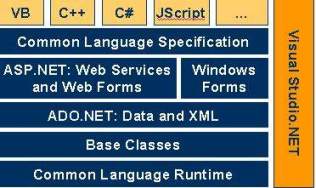
Architecture is explained form bottom to top in the following discussion.
-
At the bottom of the Architecture is Common Language Runtime. NET Framework common language runtime resides on top of the operating system services. The common language runtime loads and executes code that targets the runtime. This code is therefore called managed code. The runtime gives you, for example, the ability for cross-language integration.
-
.NET Framework provides a rich set of class libraries. These include base classes, like networking and input/output classes, a data class library for data access, and classes for use by programming tools, such as debugging services. All of them are brought together by the Services Framework, which sits on top of the common language runtime.
-
ADO.NET is Microsoft’s ActiveX Data Object (ADO) model for the .NET Framework. ADO.NET is not simply the migration of the popular ADO model to the managed environment but a completely new paradigm for data access and manipulation.
ADO.NET is intended specifically for developing web applications. This is evident from its two major design principles:
1) Disconnected Datasets—In ADO.NET, almost all data manipulation is done outside the context of an open database connection.
2) Effortless Data Exchange with XML—Datasets can converse in the universal data format of the Web, namely XML. -
The 4th layer of the framework consists of the Windows application model and, in parallel, the Web application model.
The Web application model-in the slide presented as ASP.NET-includes Web Forms and Web Services.
ASP.NET comes with built-in Web Forms controls, which are responsible for generating the user interface. They mirror typical HTML widgets like text boxes or buttons. If these controls do not fit your needs, you are free to create your own user controls.
Web Services brings you a model to bind different applications over the Internet. This model is based on existing infrastructure and applications and is therefore standard-based, simple, and adaptable.
Web Services are software solutions delivered via Internet to any device. Today, that means Web browsers on computers, for the most part, but the device-agnostic design of .NET will eliminate this limitation. - One of the obvious themes of .NET is unification and interoperability between various programming languages. In order to achieve this; certain rules must be laid and all the languages must follow these rules. In other words we can not have languages running around creating their own extensions and their own fancy new data types. CLS is the collection of the rules and constraints that every language (that seeks to achieve .NET compatibility) must follow.
- The CLR and the .NET Frameworks in general, however, are designed in such a way that code written in one language can not only seamlessly be used by another language. Hence ASP.NET can be programmed in any of the .NET compatible language whether it is VB.NET, C#, Managed C++ or JScript.NET.
Quick Start :To ASP.NET
After this short excursion with some background information on the .NET Framework, we will now focus on ASP.NET.
File name extensions
Web applications written with ASP.NET will consist of many files with different file name extensions. The most common are listed here.
Native ASP.NET files by default have the extension .aspx (which is, of course, an extension to .asp) or .ascx.
Web Services normally have the extension .asmx.
Your file names containing the business logic will depend on the language you use. So, for example, a C# file would have the extension .aspx.cs.
You already learned about the configuration file Web.Config.
Another one worth mentioning is the ASP.NET application file Global.asax—in the ASP world formerly known as Global.asa. But now there is also a codebehind file Global.asax.vb, for example, if the file contains Visual Basic.NET code. Global.asax is an optional file that resides in the root directory of your application, and it contains global logic for your application.
All of them are text files
All of these files are text files, and therefore human readable and writeable.
The easiest way to start
The easiest way to start with ASP.NET is to take a simple ASP page and change the file name extension to .aspx.
Page Syntax :
here is quick introduction of syntax used in ASP.NET
Directives
You can use directives to specify optional settings used by the page compiler when processing ASP.NET files. For each directive you can set different attributes. One example is the language directive at the beginning of a page defining the default programming language.
Code Declaration Blocks
Code declaration blocks are lines of code enclosed in tags. They contain the runat=server attribute, which tells ASP.NET that these controls can be accessed on the server and on the client. Optionally you can specify the language for the block. The code block itself consists of the definition of member variables and methods.
Code Render Blocks
Render blocks contain inline code or inline expressions enclosed by the character sequences shown here. The language used inside those blocks could be specified through a directive like the one shown before.
HTML Control Syntax
You can declare several standard HTML elements as HTML server controls. Use the element as you are familiar with in HTML and add the attribute runat=server. This causes the HTML element to be treated as a server control. It is now programmatically accessible by using a unique ID. HTML server controls must reside within a
Jalsa Movie Mp3 Songs Download And Lyrics
Starring : Pawan Kalyan,
Ileana D'Cruz,
Paresh Rawal,
Prakash Raj
Directed by : Trivikram Srinivas
Produced by: Allu Aravind
Written by : Trivikram Srinivas
Music by : Devi Sri Prasad
Distributed by : Geeta Arts
Release date(s) : March 2008
Language : Telugu
Budget : 25 crores

01. Sari Gama Pada Nisa Download
They call him a cool cool angry man
super andhra thelusa
its the time for toll and the beat
come on come on karo jalsa
jalsa jalsa jalsa jalsa....yo yo yo yo.
yo he’s the man yo the jackie chan
he’s the king of the andhra
his place is the super groovy hyderabad
and she is the baby gal sandra
yeah sari gama pada nisa
yeah karo karo jara jalsa
jalsa . .. . .jalsa....
sani dapa maga risa
karo karo jara jalsa
thelusa thelusa thelusa evarikaina thelusa
evvarikaina tsunami eduruga vaste elaga kanipistundoo
thelsa thelusa thelusa evvarikaina thelusa
thoofanu thalupulu kodithe elaga vinabaduthundo
arey theiiyakapothe choodarababu he’s human tsunami
theliyalanu kunte danger babu u cant too believe me
hey sari gama pada nisa
arey karo karo jara jalsa
sani dapa maga risa
arey karo karo jara jalsa
height enthuntado kolavalanipisthe
amanthamu ala ala mount everest avuthadu
baitemchesthado ani saradapadithe
strecher thanai sarasari ward ki cherusthadu
arey gaddi poga andukoni tonchadanikosthe
gaddapara namilesthadu
gundusudi chetikichi danda guchamante
goddathovi aaresthadu
hey sari gama pada nisa
arey karo karo jara jalsa
sani dapa maga risa
arey karo karo jara jalsa
manavadanukunte chelikadavuthadu
hey vinamanai bujalapai savari cheyisthadu
magavadankunte vilukadavuthadu
hey pramadamai kshanalalo sevalu puttisthadu hey guvuthadi poolani thechipettamante
thotalani tholukosthadu
yama baanam vachi peekachuttukunte
dani thoti uyaluguthaadu
hey sari gama pada nisa
arey karo karo jara jalsa
sani dapa maga risa
arey karo karo jara jalsa
02. Gaalo Telinattunde Download
Gaalo thelinattunde
gunde pelinattunde
thene pattu meeda raayi petti
kottinattunde
ollu uginattunde
dammu Iaaginattunde
full bottle dinchakunda
thaaginattunde
urvasi oo nuvvu rakshaci ooo
nuvvu preyasi oo nuvvu naakallaki
upiri oo nuvvu uhala vooo nuvvu
uyalavo nuvvu naamanasuki
hey nidura daati kalale ponge
pedavi daati pilupe ponge
adhupu daati manase ponge naalo
gadapadaati valape ponge
chimpadaati yeruve ponge
nannu daati nene ponge neekonte oosulo
rangulovo nuvvu rekkala vo nuvvu
dikkulavo nuvvu naa asaki
thummedavo nuvvu tuntari vo nuvvu
thondaravo nuvvu naa eeduki
talpudu daati tanave ponge
siggudaati chanuveponge
gattu daati vayase ponge lo lo
kanulu daati chupe ponge
arugu daati paruge ponge
haddu daati vayase ponge
nee chelipi navvulo
thurupuvo nuvvu vekuvavo nuvvu
suryudivo nuvvu naa ningi ki
jabili vo nuvvu vennelavo nuvvu
taarakavo nuvvu naa ratriki
03 . My Heart is beating Download
My Heart is beating...adhola
thelusuk ova...adhi
ennali waiting anela
tharumuthondi madhi
pedavi pai palakade manasulovunna sangathi
kanulalo vethikithe urukutundi...
tea spoon nannu baruvavuthunde
full moon nannu vudikistunde
kaalakinda ochinde
landmine gundelo peelinnde
My Heart is beating...adhola
thelusukova...adhi
ennali waiting anela
tharumuthondi madhi
penuthufaanu edaina merupuladi chesinda
vurukuleni mainkana madini munchi poyinda
vurikine kargadu ga vupiri tana toli baarami gaa
velugulake vunnatigaa naalo niluvella
talapulalo tolabadutu gajibiji gaa chelaregala
talagadatho thelbadutu thelarlu vontarigaa vegala
cellphone nee kaburu thestunte
stengun moginattu untunde
crompton fan gaali vistunte
cyclone thakinattu untundee
My Heart is beating...adhola
thelusukova.. .adhi
ennali waiting anela
tharumuthondi madhi
eppudela thelistaano naamede naku anumaanama
maatallo painakanesthanu nee meeda unna abhimaanam
twara twaragaa tariminade pada pada padamani
paduchuradham
yedalayalo migilinde madanudi chilipi rythm
gusa gusa gaa pilichinade manasuna virusuna kalala vana
taha taha gaa tariminade tappade tappadu chupe anandan
freedom dorikanttu galulo welcome pilupu vinipistunte
baanam vesinattu cc villo baanam doosukelli pothunte
My Heart is beating...adhola
thelusukova .. . adhi
ennali waiting anela
tharumuthondi madhi
Torrent Downloads: Torrents Galaxy ; TheMediaSite
Nesthama Mp3 Songs Download
Starring : Aakash, Biyanka, Poonam Singar, Vijay, Bramhanandam, Dharmavarapu Subrahmanyam
Music:Joy Kalvin
Direction : S. Veerendra Reddy
Banner: Raaga Movies
Production:Lanka Shivashankar, Lanka Karunakar
Language : Telugu
Year : 2008
01.Kalalu Kane Download
Singer : Tippu, Divya, Ravi
Lyrics : Lanka Karunakar
02.E Janmado Download
Singer: Karthik, Chinmayi
Lyrics: Saarapu Santoshkumar
03.Chinadana Download
Singer : Tippu, Anuradha Sriram
Lyrics : Lanka Karunakar
04.Enni Ooslo Download
Singer : Jeans Srinivas
Lyrics : S. Veerendra Reddy
05.Gudelona Download
Singer : Anitha Krishna
Lyrics : Paidisetty Ram
06.Ee Vela Naalo Download
Singer : Chinmayi
Lyrics : Saarapu Santoshkumar
Single Download Links : Link1, Link2
Torrent Downloads: Torrents Galaxy ; TheMediaSite
John Apparao 40 Plus Mp3 Songs Download
Starring : Krishna Bhagawan (as Fashion Designer), Simran, Sayaji Shinde, Ali, Brahmanandam, Jeeva, Melkoti, Ruthika, Apoorva
Music : Kiran Varanasi
Camera : Sameer Tahir
Direction : Kuchupudi Venkat
Producer : P Anil Kumar Reddy, Dandamudi Sambhasivarao
Language : Telugu
Audio On: Supreme
CD Rip : 320KBPS
Year : 2008
Movie Facts
************
- This is the first movie featuring Krishna Bhagawan in a hero role.
- Hero plays the role of a fashion designer and stays away for marriage due to responsibilities. By the time he wants to marry, he is already way above the age.
- The story rotates about how the hero finds a match and how he conviences her.
01. Meghalalo Download
Singer: Sainoj, Delsy
02.Ninnu Kori Download
Singer: Pranavi
o3.Ennenno Download
Singer: Hemachandra, Geetha Madhuri
04.Kajara Download
Singer : Tanya, Kiran Varanasi
Lyrics: Kiran Varanasi
05.O Bangaru Download
Singer : Dr. Banti, Pooja
Single Download links : link1, link2
Torrent Downloads: Torrents Galaxy ; TheMediaSite